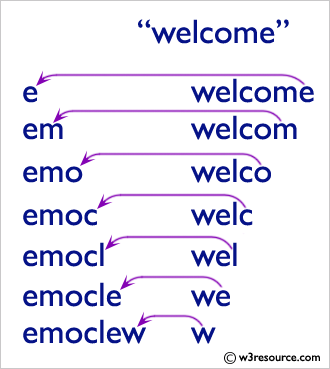
By using the following example we can print the String in reverse order
For Example enter String which you need to print in reverse order by using the for loop
Click on Visual Studio it is an IDE for the .Net developer's:

After this you can write your Project name like ReverseofaString for our better understanding purpose:


Here in this we are having the menu bar with some menus like
- File,
- Edit,
- Debug,
- Build,
- Test,
- Analyze
With that you can write the logic in Code Editor We can write the logic what we want based on our requirement like below:
 using System;
 namespace ReverseOfastring
 {
   class Program
   {
     static void Main(string[] args)
     {
       string reverse = "";
       Console.WriteLine("Enter a String");
       string Name = Console.ReadLine();
       for(int i=Name.Length-1;i>=0;i--)
       {
         reverse = reverse + Name[i];
         Console.WriteLine(reverse);
       }
       Console.Write("Finally the string in Reverse Order Is : {0}", reverse);
       Console.ReadLine();
     }
   }
 }
Finally the output of the above program is:
 Enter a String
 WELCOME
 E
 EM
 EMO
 EMOC
 EMOCL
 EMOCLE
 EMOCLEW
 Finally the string in Reverse Order Is: EMOCLEW
The program will be looking like below in the visual studio:

The Output will be displayed in command prompt:

Comments
Post a Comment